A Goodie is the core element of your GuestGoodie back office. Every offer, every piece of information, and every experience you want to present to your guests is created as a goodie. From these goodies you then proactively control what your guests see in the feed and how your guest app is organized.
The 3 Goodie Types
Depending on the type of your offer, you choose the appropriate goodie type:
1. Offer
Versatile goodie type for services, recommendations, and information
- Examples: Massages, beauty treatments, restaurant recommendations, sights, bar info, pool rules, WiFi info
- Special features: Flexible button system (Bookable, Link, File, Hide), opening hours, request booking
- Button Options:
- Bookable: For services like massages or treatments - guests can book
- Link: For recommendations with external website (e.g., restaurants, sights)
- File: For downloadable files (PDFs, images) like menus or brochures
- Hide: Information only without action (e.g., bar info, pool rules)
2. Event/Weekly Schedule
Time-limited events with fixed dates
- Examples: Yoga classes, wine tastings, cooking classes, hikes, happy hour, live concerts
- Special features: Recurring appointments, limited number of participants, "Can join during event" option
- Button Options:
- Bookable: Guests can register (e.g., yoga class)
- Hide: Information only without registration (e.g., happy hour)
- New Features:
- "Can Join during Event": Ideal for events guests can join while it's already happening (happy hour, live concerts)
3. Message
Personal messages to your guests
- Examples: Welcome greeting, weather updates, special announcements
- Special features: Direct communication, bring your charm, perfect for video messages
How Goodies Work in GuestGoodie
Your created goodies are the basis for two important areas in your guest app:
From each goodie you can specifically create Promotions that then appear in your guests' GuestGoodie feed. Here you add sales impulses and actively control which offers your guests see.
→ More about this in the article: Editing your GoodieFeed
Categories for the Guest App
You organize your goodies in Categories (e.g., Wellness, Sports, Culinary, Guest ABC) so your guests can quickly find what they're looking for in the app.
→ More about this in the article: Classic View
How Everything Connects
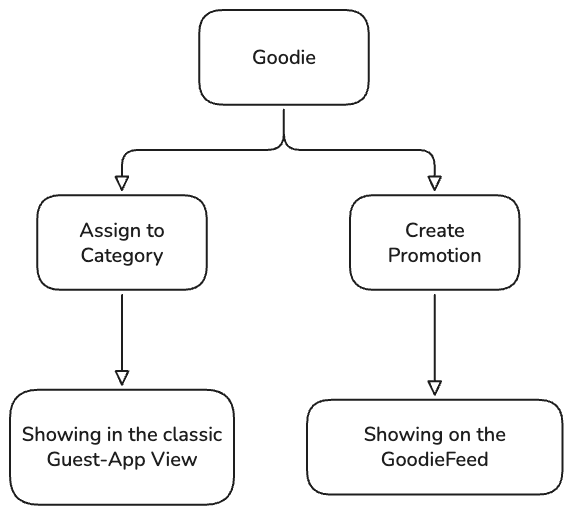
Example: You create an offer goodie "Relaxation Massage" with bookable button. From this you make a promotion "Today only: 20% off massages" for the feed AND assign the goodie to the "Wellness" category so guests can also find it through the categories overview.
Create Goodies
You create new goodies easily via the Goodies tab in your sidebar. With one click on the large plus symbol you create a new goodie.
→ Step-by-Step Guide: Editing Goodies
Tip: Start with your hotel's most important offers as goodies. You can always add more and adjust existing ones – this way you proactively control what your guests experience and book.