Step 1: Open the Integrations Screen
- Click on the Hotel Popover in the bottom left corner (showing your hotel name)
- Select "Integrations" from the menu
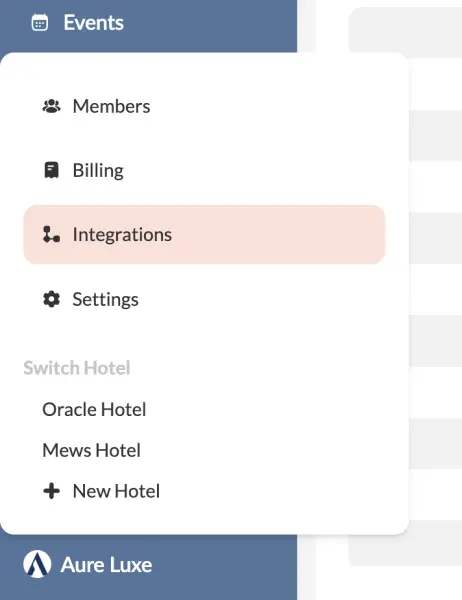
Here you'll see all different integration categories. To learn more about them, see:
Step 2: Choose Your Desired Provider
The integrations page will open, showing all currently supported providers.
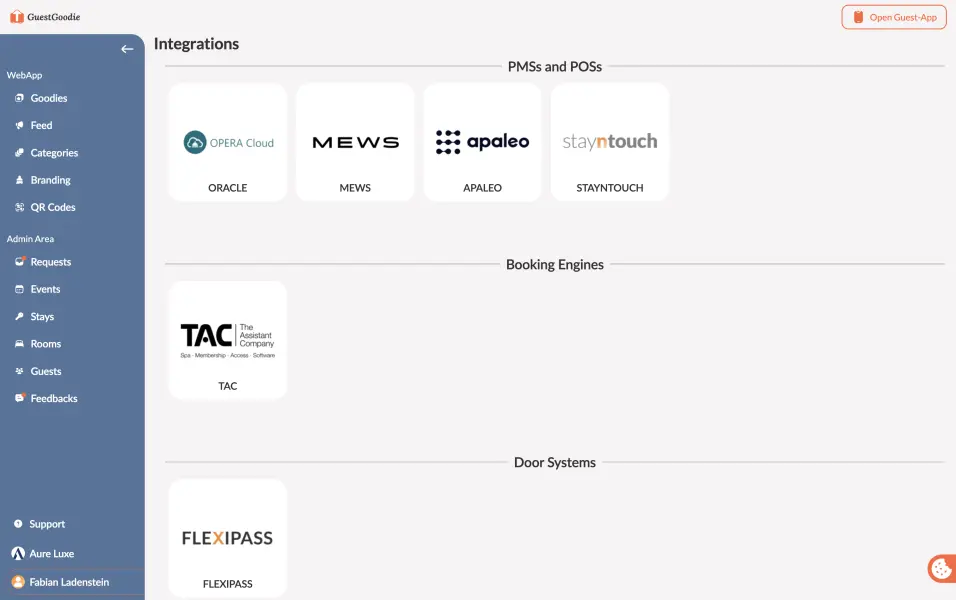
We're constantly adding new integrations. If your desired integration isn't listed, please contact us at help@guestgoodie.com. If the provider supports integrations, we can set one up for you.
Step 3: Follow the Setup Process
After selecting your provider, the dialog will guide you through the connection process. Each provider has its own setup requirements, but the dialog will provide clear instructions for:
- Entering credentials or API keys
- Authorizing the connection
- Completing the setup
Simply follow the on-screen instructions to complete the integration.
After Connection
Once your provider is successfully connected:
- Automatic Synchronization: Data is synced immediately
You can now focus on creating great experiences for your guests while GuestGoodie handles the data synchronization.
Deleting an Integration
If you want to remove an integration, you can easily do so by clicking on the provider again and pressing "Uninstall". We try our best to keep data from your integration when necessary to prevent any migration difficulties.
Next Steps: Learn how the different integrations help you use GuestGoodie even better: